Side Sleeping and CPAP Mask Airflow: Recording Your Observations for Equipment Review
When using continuous positive airway pressure (CPAP) equipment while sleeping on your side, you might notice air movement around the mask as you change positions. Because feeling or hearing air flow can happen for various reasons, keeping an objective CPAP mask airflow observation record helps you gather clear notes to share with your equipment provider.
Keeping a clear observation record helps you gather factual notes about CPAP mask airflow before speaking with your equipment supplier. This guide explains how to complete a simple 7-field observation log without making assumptions, and how to structure your questions for an upcoming equipment review. This article is categorized under our CPAP & Sleep Section.
Table of Contents

Side Sleeping and CPAP Mask Airflow Observations
As you shift positions during sleep, you may notice air moving near your face or mask. Documenting these occurrences involves describing what you observe rather than deciding whether the CPAP mask airflow represents a leak, normal venting, or an equipment fault. Observing these movements systematically helps organize your notes for a supplier review.
When you notice CPAP mask airflow, keeping your written notes focused on factual descriptions helps provide clear observation details. By writing down what you observe plainly, you build a consistent record that helps guide your upcoming equipment review.
A Structured Blank Observation Record
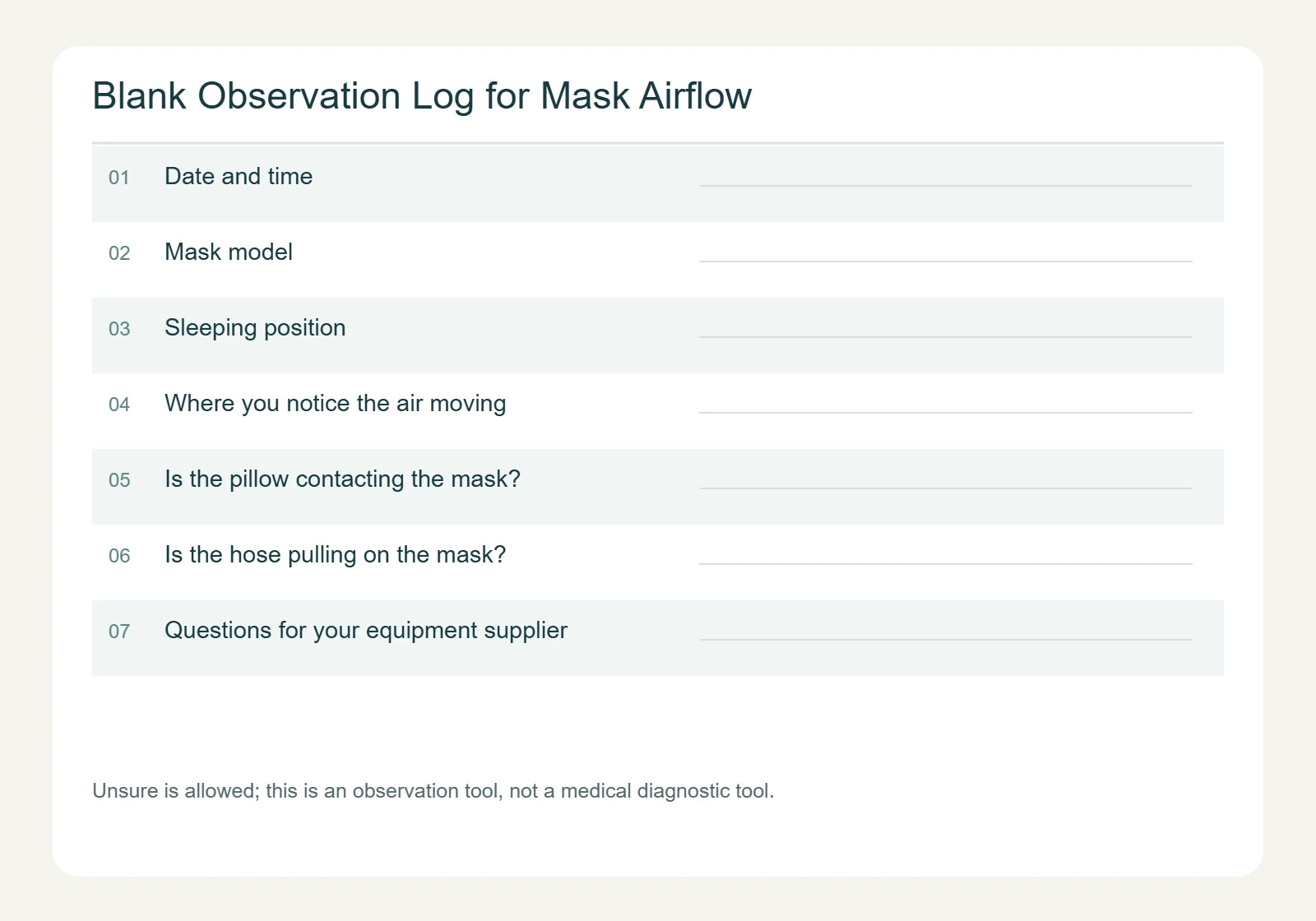
You can copy and use the blank observation log below for each night or time you notice CPAP mask airflow. This log is an observation tool designed to help you organize your notes before speaking with your supplier; it is not a medical diagnostic tool and does not measure therapy performance.
| Observation Field | Your Notes |
|---|---|
| Date and time | |
| Mask model (if known; leave blank if unsure) | |
| Sleeping position | |
| Where you notice the air moving (unsure is allowed) | |
| Is the pillow contacting the mask? (unsure is allowed) | |
| Is the hose pulling on the mask? (unsure is allowed) | |
| Questions for your equipment supplier |
How to Complete Each Log Field Clearly
To help make your written observations of CPAP mask airflow as clear as possible, each entry field addresses a specific piece of context. The details below explain what to record for each field, along with illustrative examples to show how notes can be written naturally.
Date and Time
- Information Purpose: Anchors your observation to a specific moment so you can keep your entries in chronological order.
- Writing Recommendation: Record the calendar date and the immediate time of night or morning when you notice air movement. If the exact time is uncertain, recording an approximate time or marking it as unknown is completely valid.
- Hypothetical Example Only: November 3, 2:15 AM (or November 3, Middle of night / Time unknown).
Mask Model (If Known)
- Information Purpose: Identifies your equipment model if you have that information readily available from your existing records or packaging.
- Writing Recommendation: Write down the exact model name printed on your device packaging or documentation. If you do not know the model name, simply leave this space blank.
- Hypothetical Example Only: ResMed AirFit F20 (or left blank if unknown).
Sleeping Position
- Information Purpose: Captures your body and head orientation at the time you notice CPAP mask airflow.
- Writing Recommendation: State whether you were on your left side, right side, or moving between positions when you noticed the CPAP mask airflow.
- Hypothetical Example Only: Lying on left side facing the outer edge of the bed.
Where You Notice the CPAP Mask Airflow
- Information Purpose: Records the physical location where you feel or hear air movement.
- Writing Recommendation: Describe the specific area on your skin or face where CPAP mask airflow is felt, such as near the cheek or eyes. If you cannot identify the location, writing “unsure” is completely valid.
- Hypothetical Example Only: Air movement felt across the left cheek area (marked as unsure of exact location).
Is the Pillow Contacting the Mask?
- Information Purpose: Notes any observed contact between your bedding and your mask.
- Writing Recommendation: Record “Yes”, “No”, or “Unsure” based on what you observe in the moment.
- Hypothetical Example Only: Yes, the pillow edge was resting against the side of the mask.
Is the Hose Pulling on the Mask?
- Information Purpose: Notes whether you observe physical tension on the tubing.
- Writing Recommendation: Record “Yes”, “No”, or “Unsure” based on whether the hose appears taut or pulled.
- Hypothetical Example Only: Unsure; hose position was noted but tension was not confirmed.
Questions for Your Equipment Supplier
- Information Purpose: Captures the questions you want to ask during your equipment review while your observations are fresh.
- Writing Recommendation: Note plain questions regarding documentation, fit checks, or required information.
- Hypothetical Example Only: Can we review the official documentation for my mask model, and can you check my current mask fit?
Guidelines for Log Management, Transcription, and Review
Organizing your handwritten or typed notes into a clean, structured summary helps ensure that your communication regarding CPAP mask airflow with your equipment supplier remains efficient and clear.
Handling Multiple Observations and Uncertain Timestamps
When tracking CPAP mask airflow across separate instances, assigning simple numbers to each entry helps keep distinct moments organized:
- Assigning Sequence Numbers: Label separate events clearly as “Observation #1,” “Observation #2,” and so on under the same date header. This allows you to log distinct moments without confusing the details of each occurrence.
- Recording Uncertain Timestamps: If you awaken and notice CPAP mask airflow but cannot verify the clock time, do not try to guess or recalculate the hour. Simply record “Time: Approximate 3:00 AM” or “Time: Unknown / Nighttime.” Explicitly labeling uncertainty is far more accurate than inserting a forced estimate.
- Distinguishing Log Entry Time from Observation Time: Clearly separate when you experienced the air movement from when you wrote down the note. For example, if you noticed CPAP mask airflow during the night but transcribed the details into your permanent log the following morning, record both timestamps separately: “Observation Time: Nighttime (Exact hour unknown) | Note Created: Nov 3, 8:00 AM.”
Correcting Transcription Errors While Preserving Original Intent
When copying raw nighttime scribbles into a clean digital document or fresh notebook before meeting your provider, preserving your original intent for every CPAP mask airflow note is essential:
- Preserving Original Uncertainty: If an entry states that the location was marked as unsure, keep that field marked as unsure during transcription rather than altering it to a specific location later. Later recollections should be recorded separately with their creation time noted rather than overwriting original entries.
- Using Explicit Revision Notes: If you realize that a raw word was misspelled or visually unclear, write out the cleaned version and add a brief parenthetical note explaining the clarification.
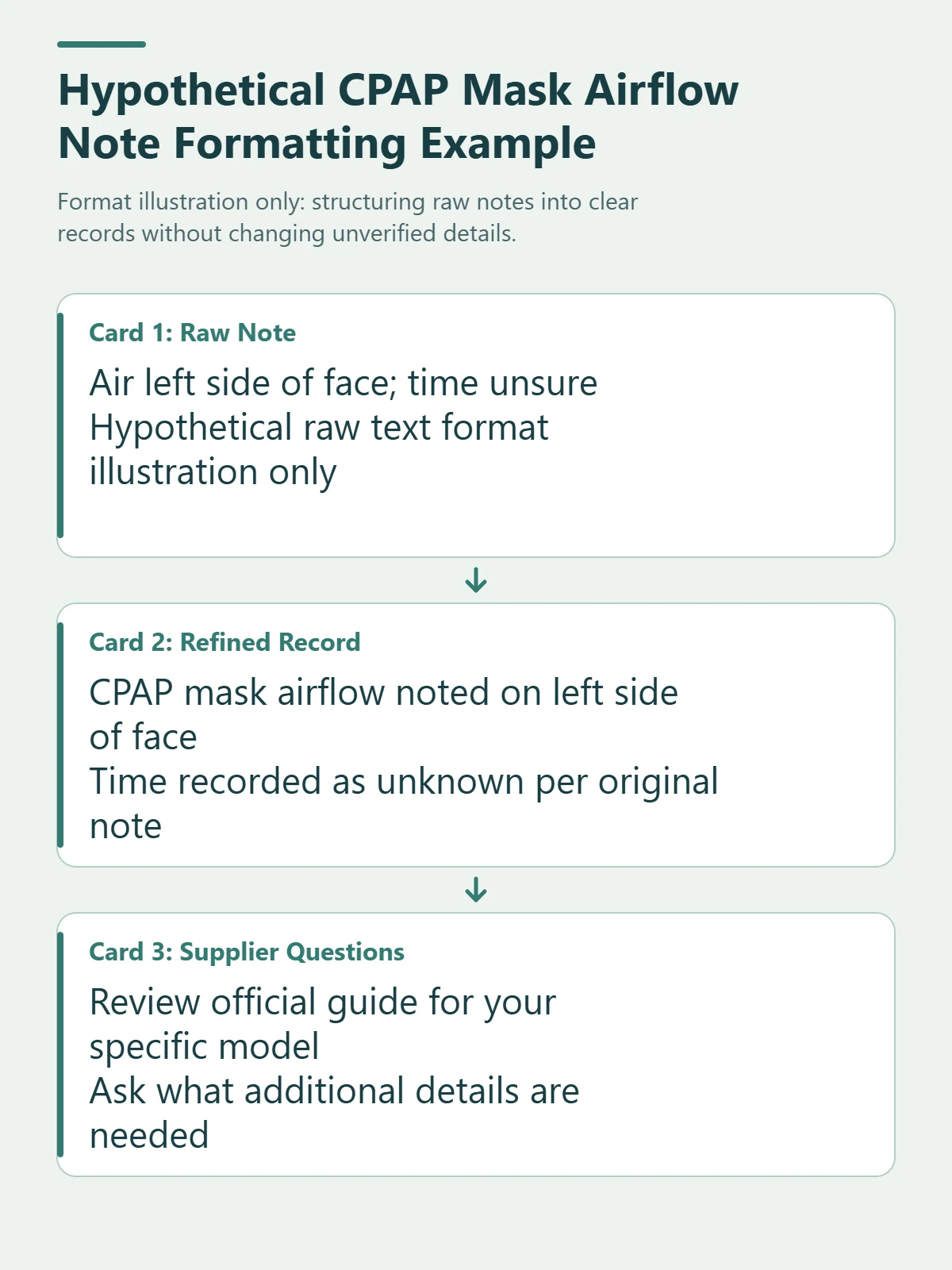
- Two Hypothetical Transcription Examples (Format Illustration Only):
- Example A (Preserving Uncertainty):
- Raw Note: “Air felt somewhere on left side of face, not sure where.”
- Cleaned Entry: “Location: Left side of face (Unsure of exact location).”
- Example B (Clarifying Wording Without Changing Facts):
- Raw Note: “Pillow was touching edge.”
- Cleaned Entry: “Pillow Contact: Unsure (Raw note states: ‘Pillow was touching edge’; mask contact was not explicitly recorded). [Note: Clarified during transcription].”
Organizing a Post-Communication Q&A Follow-Up Log
If your equipment provider answers your inquiries or references specific manuals during your review, keeping a structured record of that discussion helps organize the information:
- Documenting Specific Supplier Responses: If your equipment supplier provides answers during your review, list each question alongside the plain-language response received. Do not mark questions as answered or confirmed if no response was provided.
- Citing Referenced User Guide Editions: If your supplier cites specific user guide document numbers or revision codes during your discussion, note those exact document identifiers next to your questions for future reference.
- Tracking Unresolved Items and Open Questions: Create a dedicated bullet point for any question that was not fully answered or requires further observation. Clearly labeling items as “Pending Provider Follow-up” or “Awaiting Next Supply Review” keeps your notes organized without assuming unconfirmed conclusions.
- Distinguishing Provider Guidance from Personal Notes: Use separate columns or headings to distinguish direct statements made by your supplier from your own summary thoughts.
Simple Supplier Communication Cover Sheet Template
You can copy and adapt this simple text outline to place on top of your CPAP mask airflow observation notes when preparing to communicate with your supplier:
CPAP Equipment Observation Log Cover Sheet
User Information
- Date of Submission:
- Preferred Contact Method:
Equipment Identification
- Mask Model:
Observation Summary
- Primary Sleeping Positions Noted:
- Main Airflow Locations Noted:
- Observed Bedding or Hose Interactions:
Questions for Review
- Official Documentation: Can we review the user guide for my mask model?
- Equipment Check: Can you check my mask fit and part conditions?
- Needed Details: What additional information do you need from my observation log?
Verification Methods for Transferring Written Notes to Text Documents
When moving handwritten notes regarding CPAP mask airflow from paper into a plain text document or structured spreadsheet, double-checking your entry formatting prevents formatting errors. If your handwritten notes contain shorthand or inconsistent spacing, taking care during transcription helps keep the details readable. Establishing a clean text layout ensures that your notes remain legible when shared with your equipment provider.
To maintain structural clarity during transcription, assign every entry field detailing CPAP mask airflow to its own distinct line. Placing multiple fields on a single line increases the risk of misalignment, especially when copying text across different devices or text editors. When working with tabular data, ensure that date columns match their corresponding notes. If a date header shifts relative to its row, an observation recorded on one night could be incorrectly associated with an entirely different time.
Distinguishing skipped fields from verified observations when recording CPAP mask airflow helps keep your log clear. Leaving a field completely blank creates confusion, as anyone reading the record cannot tell whether an item was checked or overlooked. Write “None” when a condition was checked and not present, “Not recorded” when an item was omitted, and “Unsure” when a detail could not be verified. Avoid combining separate line breaks into a single line, as merging distinct entries makes the timeline harder to follow.
Review the hypothetical formatting comparison below to see how handwritten CPAP mask airflow shorthand should be structured into plain text:
- Hypothetical Raw Handwritten Note (Format Illustration Only):
Nov 3 night time left side face air hose pulled maybe? pillow touching edge missing model name
- Hypothetical Clean Text Layout (Format Illustration Only):
- Date and Time: November 3, Nighttime (Exact hour unknown)
- Mask Model: Unknown (Not recorded)
- Sleeping Position: Unknown (Not recorded in raw note)
- Where You Notice the Air Moving: Left side of face
- Is the Pillow Contacting the Mask?: Unsure (Note states pillow touching edge)
- Is the Hose Pulling on the Mask?: Unsure (Note states hose pulled maybe)
- Questions for Your Equipment Supplier: None recorded for this entry
Preparing a One-Page Summary Without Losing Original Logs
Before presenting your CPAP mask airflow notes to your supplier, organizing longer records into a concise one-page summary streamlines your discussion while keeping your raw entries intact. A well-structured summary allows your equipment provider to scan your primary observations quickly without forcing them to decipher pages of raw notes during a brief consultation.
Assigning a reference code to each CPAP mask airflow entry makes it easy to match specific notes across your records. Labeling entries sequentially, such as “Entry-01” or “Entry-02,” lets you link questions directly to a specific observation. When organizing your notes, avoid turning individual events into broad statements like “leaks all night” or “happens every day.” Specific details—such as sleeping position or hose tension—are much more useful during an equipment review.
When transcribing shorthand or illegible handwriting related to CPAP mask airflow, preserve your original wording rather than attempting to interpret unclear terms. If a handwritten word cannot be read with complete certainty, transcribe the legible letters followed by a question mark in brackets, such as “cheek [?]”. This practice alerts your supplier to ambiguous entries without introducing speculative changes.
If your equipment supplier leaves certain inquiries unanswered during a review, leave those summary fields blank or label them as “Unanswered” rather than assuming confirmation. When citing documentation during your meeting, recording the exact user guide document numbers and revision codes directly on your summary sheet provides a clear reference for your own records.
Note: The summary outline below uses an independent sample layout to illustrate how log entries can be formatted for a supplier discussion.
- Hypothetical Summary Outline Example (Format Illustration Only):
- Summary Reference ID: Summary-2026-X
- Linked Log Entries: Entry-A, Entry-B
- Primary Position Recorded: Left side (Entry-A), Right side (Entry-B)
- Observed Airflow Locations: Left side of face (Entry-A), Unsure (Entry-B)
- Pillow / Hose Observations: Hose tension unconfirmed (Entry-A), Pillow edge contact noted (Entry-B)
- Document Revision Cited: ResMed Document 638369/1 (If referenced during review)
- Supplier Response Status: Documentation review (No response recorded yet) | Cushion size check (Pending further supplier feedback)
Checking Specific Mask Model Documentation
The official user guide for the ResMed AirFit F20 and AirTouch F20 full face masks (including for Her variants) notes that the mask incorporates intentional venting features (see the ResMed AirFit F20 User Guide). This information applies specifically to the listed AirFit F20 and AirTouch F20 models and does not describe other mask models or determine the nature of your observed airflow.
Manufacturer user guides describe the intended setup and safety features for that specific model. Reviewing the official documentation for your exact mask model helps you understand its general design. Refer directly to the user guide provided with your equipment or contact your supplier if you have questions about your model’s documentation.
Questions to Ask Your Equipment Supplier
When you contact your equipment supplier, providing your log entries helps them review your setup. You can focus your discussion around three clear questions:
- Official Documentation: “Can we review the official user guide for my specific mask model to ensure I am familiar with its design and intended setup?”
- Fit and Replacement Parts: “Based on my observations, can you check my mask size, headgear condition, and cushion wear to see if any parts need adjustment or replacement?”
- Additional Information: “Here are the specific times, sleeping positions, and airflow locations I noted—what additional information do you need from me?”
Do not attempt to block vent areas, alter equipment parts, adjust prescribed therapy pressure, or change how you use your equipment on your own.
A brief overview showing how to document your observations and consult your equipment supplier.
Video transcript
Step 1: Record your nightly airflow observations without guessing the cause. Step 2: Check the official user guide for your specific mask model. Step 3: Share your log notes and ask your equipment supplier to review your setup. Consult your equipment supplier for professional guidance.
Next Steps
If you notice ongoing air movement during side sleeping, share your completed observation log with your equipment supplier so they can help review your equipment setup.
References
- ResMed. AirFit F20 / AirTouch F20 User Guide (Document 638369/1, Internal Revision May 2024, Americas Multi-Language edition). This reference cites this specific document edition covering model identification (page 7), safety and vent features (page 9), intentional venting (page 18), and revision details (page 77). Available via ResMed User Guide PDF.


 English
Leave a Reply